
Enable auto-finalisation
Enable auto-finalisation
Section titled “Enable auto-finalisation”Turn on auto-finalisation to make a syndicate run pay-as-you-go: a booking finalises the moment a member submits a clean usage log, with no admin step. “Clean” means the start meter on the new log lines up with the end meter on the previous flight on that asset. When it does not, the booking stays in the unfinalised queue and a notification fires for the submitter and admins.
If your syndicate prefers monthly admin reconciliation, leave this toggle off and use finalise multiple bookings at once instead; that path runs the same look-back continuity check, batched and admin-triggered at month-end.
Before you start
Section titled “Before you start”- You must be an admin (treasurer counts as admin).
- Auto-finalisation is on by default for a new syndicate. Leave it on so flying turns into charges without an admin step, or turn it off to reconcile monthly instead. If members regularly forget to log flights or typo their meter readings, the look-back check will keep skipping bookings into the queue, so the toggle saves less admin work than it promises.
- Auto-finalisation does not bypass continuity checks. A submitted log whose start reading disagrees with the previous flight’s end reading is still saved, but finalisation is skipped and the booking stays confirmed. The submitter and all admins receive a tacho-continuity notification; that delivery is critical-tier and cannot be silenced in notification preferences.
- Eager finalisation accepts a known trade-off: occasionally a flight will finalise before a later flight reveals that the earlier reading was off. The recovery is admin-driven and forward-only; see correct a finalised booking.
- Open the syndicate you want to configure.
- Tap the Admin tab.
- Tap Payments (under Money), then Billing.
- The Auto-finalise bookings switch is the first control on the screen, above When charges become due. It sits there because it is the first gate on a charge existing at all: it decides whether a member’s flying becomes a charge without an admin step. It is not on Asset rates, and meter labels are on Admin → Usage capture.
- Tap the switch to turn it on. The change saves immediately; you see a Settings saved confirmation.
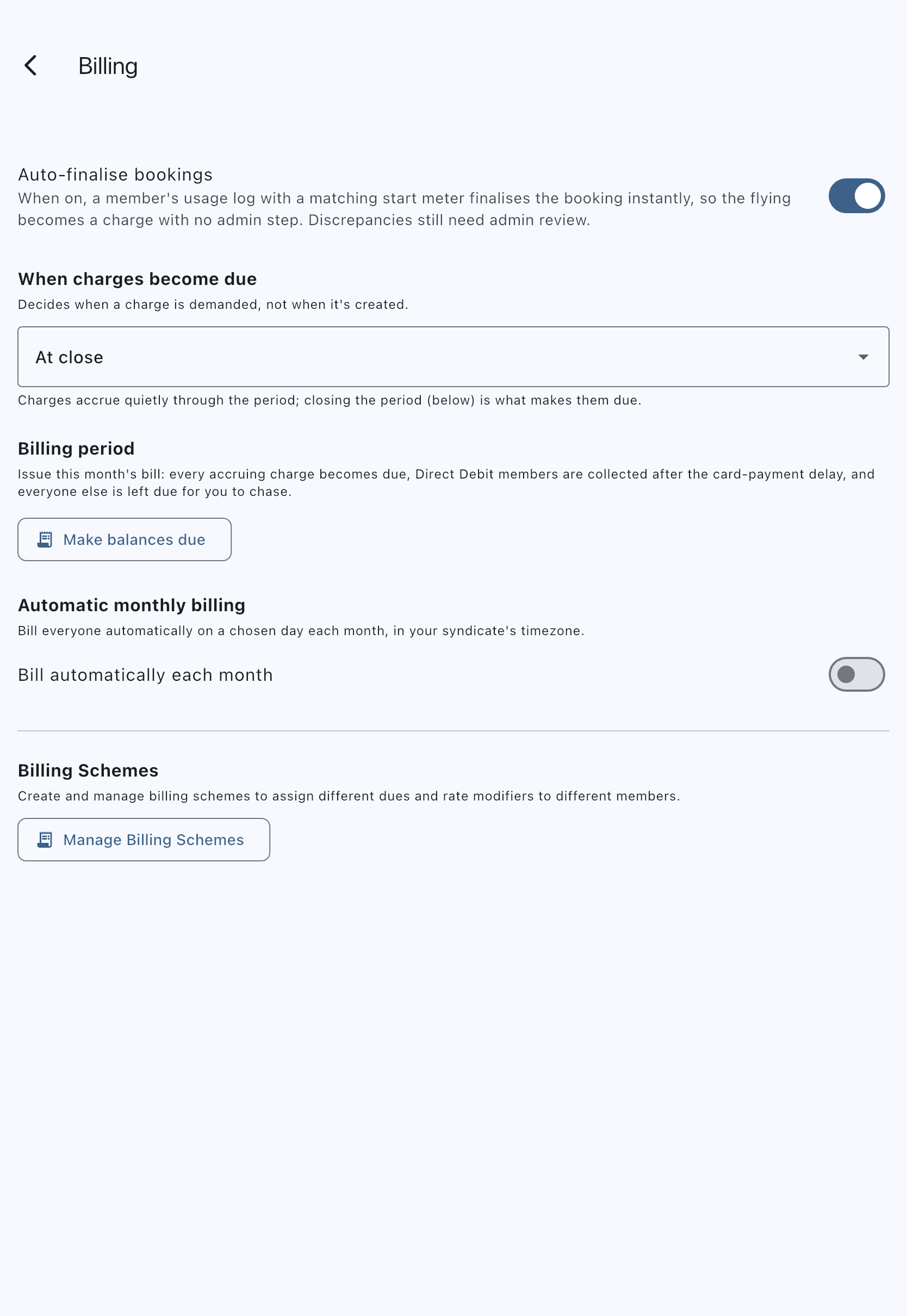
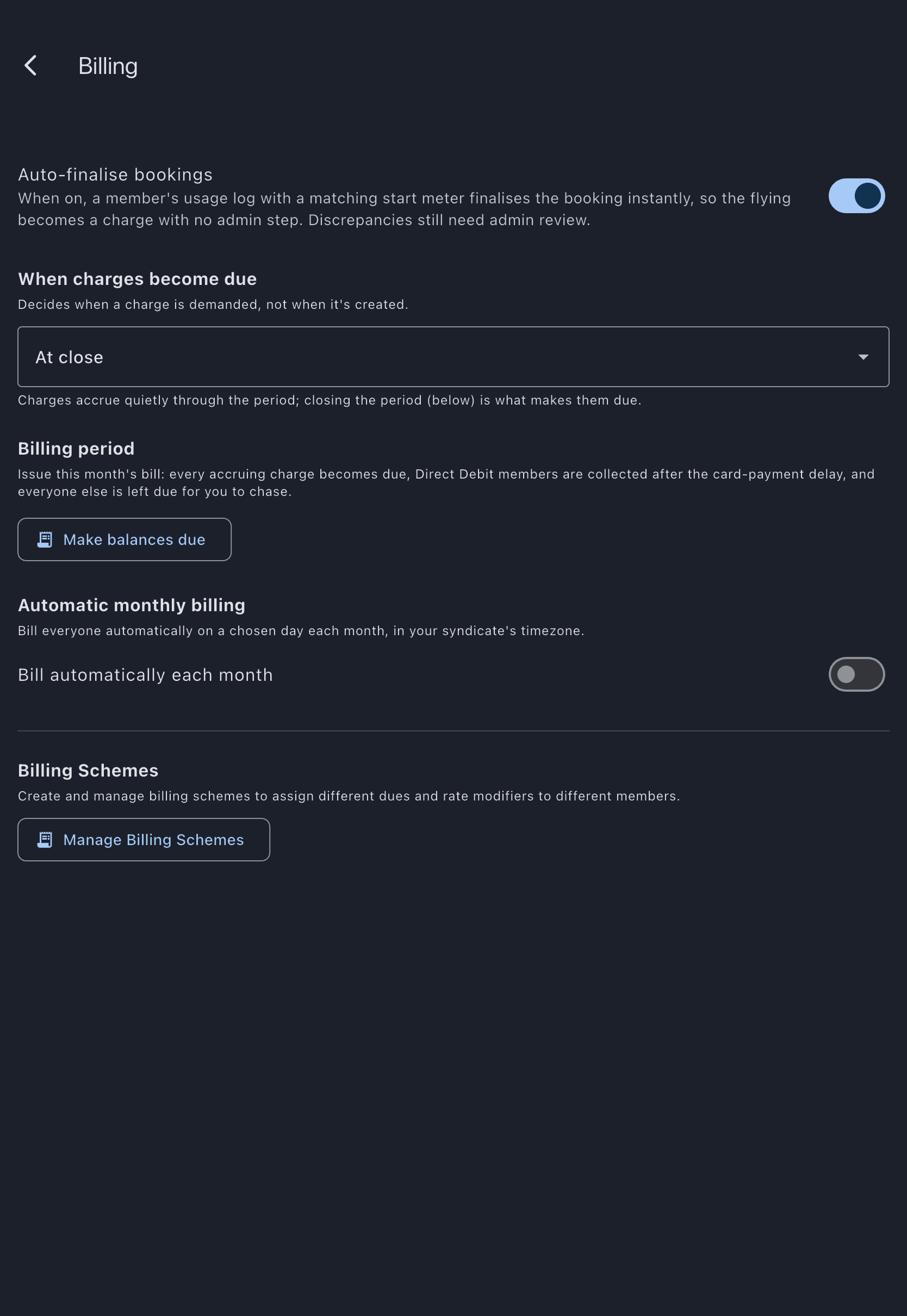
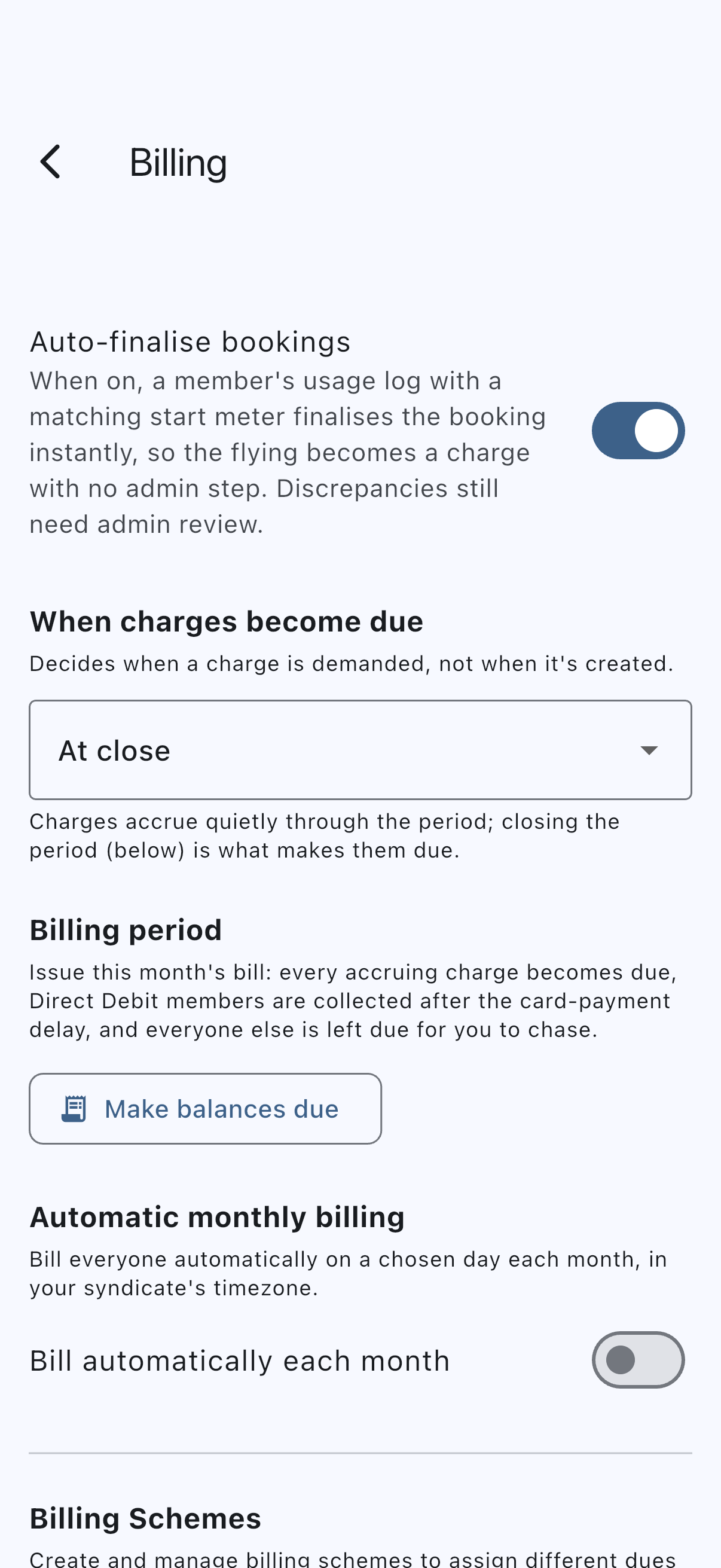
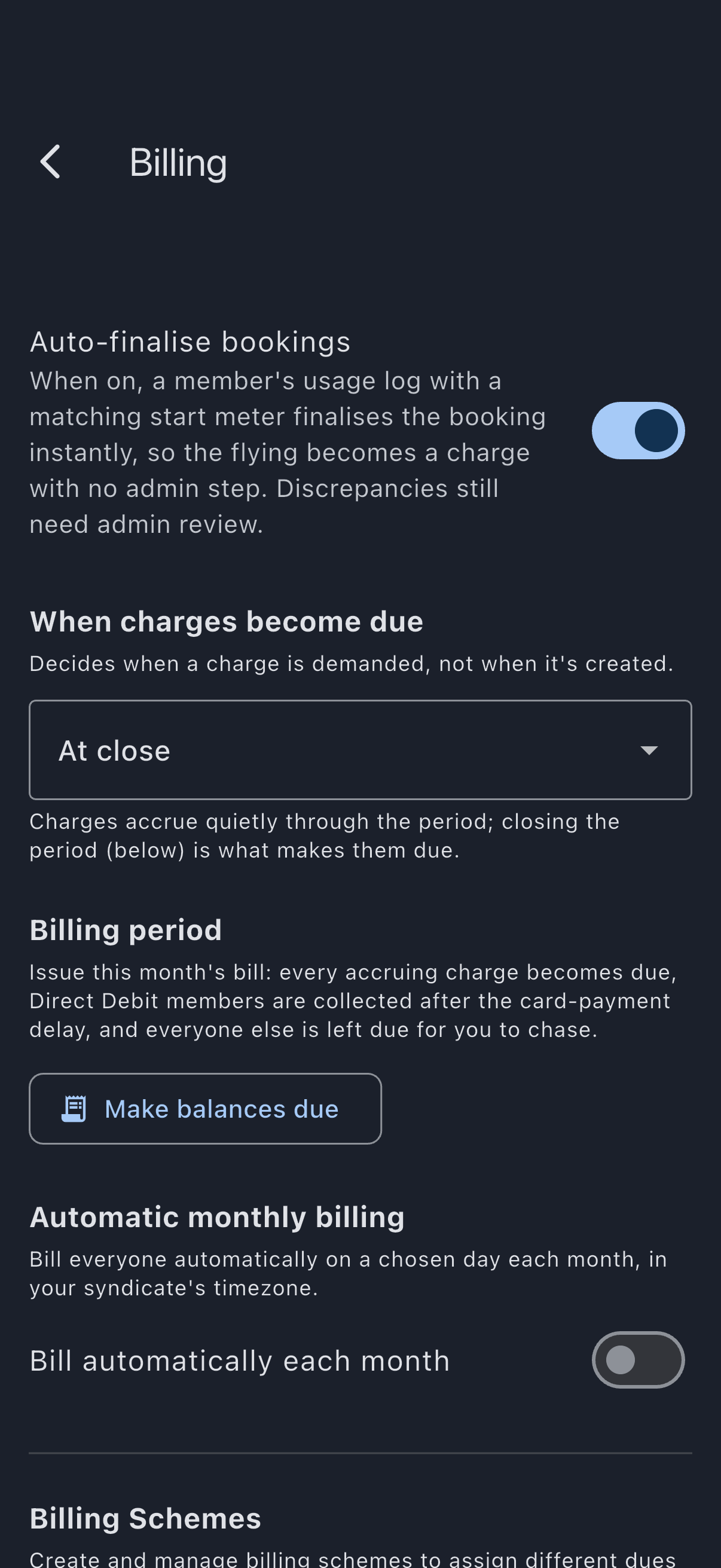
From now on, eligible bookings are finalised when a member submits their usage log, if the booking has ended and the look-back continuity check passes. Finalised transactions appear on member balances without you opening each booking.
The booking having ended is what decides whether the charge is immediate. A member who lands and then logs is charged there and then. A member who logs a leg while their booking still has time on it is not: a booking with time left may gain another leg, and billing the first would bill part of the booking and close it to the rest. That log waits, and is picked up shortly after the booking ends. The app says so when it happens, so the member is not left wondering.
Members submitting usage logs in an auto-finalise syndicate see a reminder banner on the log form: “Auto-finalise is on: this flight is charged once your booking ends, if the start reading matches the current meter. Double-check your readings.”
Where the booking is still running, the confirmation after saving says so too: “Flight logged. You’ll be charged when this booking ends.”
Typical multi-leg flow
Section titled “Typical multi-leg flow”The cleanest case for auto-finalisation is the everyday one: a member flies a leg, lands, logs it, then later flies another leg and logs that. Here’s what happens end-to-end, with concrete numbers, on a Hobbs-metered aircraft.
Starting state. The previous booking on the aircraft (flown by another member yesterday) ended at Hobbs 2202.0. Auto-finalisation is on. Alex has two confirmed bookings on the same aircraft today: a morning leg and an afternoon leg.
Leg 1: morning flight
Section titled “Leg 1: morning flight”- Alex opens the morning booking and taps Log Usage.
- Hobbs Start is pre-filled with 2202.0, read straight from the previous booking’s last log (see previous-tacho pre-fill).
- Alex taps the camera button on Hobbs End, photographs the meter, OCR fills in 2203.5, Alex confirms it matches the drum, types the landing count, and taps Log Usage.
- The log saves. Server-side, the look-back continuity check compares Alex’s start (2202.0) with the previous booking’s last log end (2202.0): match.
- Auto-finalise runs. The booking flips to
completedand a charge transaction lands in the ledger (see finalisation rules). - Alex sees a “Usage logged successfully” snackbar and lands back on the booking. The booking now reads “This booking has been finalised.”
Admin POV. Nothing arrives in the unfinalised queue. The booking shows up in the syndicate ledger as a finalised charge, typically 1.5h × £180/hr = £270 against Alex’s balance, plus any event fees configured for the syndicate.
Member POV. Alex opens My Balance and sees a fresh charge for the leg, dated today, linked back to the morning booking.
Leg 2: afternoon flight
Section titled “Leg 2: afternoon flight”- Two hours later, Alex opens the afternoon booking and taps Log Usage.
- Hobbs Start is pre-filled with 2203.5, the end reading from the morning log.
- Alex flies, lands, photographs the meter, OCR reads 2205.0, Alex saves.
- The look-back check compares submitted start (2203.5) against the morning booking’s last log end (2203.5). Match.
- Auto-finalise runs. The afternoon booking flips to
completed, a second charge transaction lands in the ledger.
Admin POV. Two legs back-to-back, two finalised charges, no admin queue work.
Member POV. Alex’s balance now shows two charges from today; the earlier “finalised” indicator on each booking matches what the admin sees.
What goes wrong, and what the system does about it
Section titled “What goes wrong, and what the system does about it”If Alex had typed 2203.0 instead of 2203.5 on Leg 2 (a typo, or a missed ground run), the look-back check would compare 2203.0 against the morning booking’s last log end (2203.5) and detect a mismatch. The log itself is still saved. Auto-finalise skips the booking, and Alex sees:
Alex is told the log was saved, that auto-finalise was skipped because this flight’s start reading does not match the previous flight’s end reading, and that it needs an admin’s review before it can finalise.
The server sends a tacho-continuity notification to Alex and to the syndicate’s admins. It names the aircraft and both readings — what the previous flight ended on, and what this flight started on — so the discrepancy is legible without opening anything. The booking turns up in the unfinalised-bookings queue with a Junction conflict badge.
The admin opens the queue, identifies which side has the wrong reading, edits the historical log to truth using the normal usage-log editor, and either lets the look-back retry pick the booking up next time it runs, or finalises manually using finalise a booking.
Out-of-order arrivals
Section titled “Out-of-order arrivals”Members do not always log in flight order. If pilot B logs straight away but pilot A (whose flight came first on the same asset) logs later, B’s auto-finalise finds no log on A’s booking and skips silently. B sees:
“Logged. Auto-finalise is waiting for the previous flight on this asset to be logged.”
The log is safe in the queue. Once pilot A logs, A’s own auto-finalise may run; B’s booking stays queued until the look-back retry (or an admin’s manual finalisation) reconciles it.
This is the boundary auto-finalisation is designed to enforce: clean data finalises instantly, dirty data lands in front of an admin, and out-of-order data waits without surprising anyone.
To turn auto-finalisation off
Section titled “To turn auto-finalisation off”Repeat the steps above and toggle Auto-finalise bookings off. Existing finalised bookings stay finalised; auto-finalisation does not reverse its past work. If automatic monthly billing is on, the same screen warns you that unfinalised bookings will not be billed.
If it goes wrong
Section titled “If it goes wrong”- A booking stayed confirmed instead of auto-finalising (“Auto-finalise skipped” snackbar). The look-back continuity check detected a meter mismatch with the previous flight on the asset. The submitter and all admins got a tacho-continuity push. Open the booking, identify which log is wrong (yours or the previous one), edit the historical log to truth, and finalise manually using finalise a booking or wait for the look-back retry.
- A booking stayed confirmed (“Auto-finalise is waiting for the previous flight” snackbar). No conflict: the immediately preceding booking on the asset hasn’t been logged yet. The booking will reconcile once the predecessor lands. No action needed.
- A member logged a flight offline. Finalisation is a ledger write and only happens online, so nothing finalises on the spot. The log saves and the member sees “Logged. It’ll finalise automatically once you’re back online.” The server runs the look-back check and finalises the booking when the log syncs; no admin step is needed.
- The member saw “Logged, but finalisation failed.” The log is saved, but finalisation errored on the server (typically a transient network problem). The member (or any admin) can retry from the booking detail screen.
- The switch is greyed out or missing. You are not an admin on this syndicate. Auto-finalisation is an admin-only toggle.
- A maintenance booking closed itself, and I have this toggle switched off. That is deliberate, and it is the one thing this toggle does not control. Flying to the engineer is met through the monthlies rather than billed per flight, so closing a maintenance booking charges nobody. The toggle decides whether a member’s flying becomes a charge without an admin’s say-so; with no charge in play there is nothing for it to decide, and the alternative is a queue row whose only available action is to close it. Maintenance bookings therefore close on the first finalisation sweep after their end time in every syndicate. Note that this is a sweep, not an instant: saving hours against a maintenance booking does not close it there and then. The same sweep is what picks up a member’s booking whose log went in before the booking ended.
- A finalised booking later turned out to have been wrong. Eager finalisation accepts this trade-off. The recovery path is correct a finalised booking: edit the historical log and post an adjustment for the difference. Do not try to “unfinalise” the booking.
See also
Section titled “See also”- Auto-finalisation: reference page with the full behaviour rules
- Tacho-continuity conflict: what makes auto-finalisation skip a booking
- Finalisation rules: what the automatic flow writes to the ledger
- Finalise a booking: manual alternative for skipped or failed cases
- Finalise multiple bookings at once: the bulk path used when this toggle is off, running the same look-back check
- Correct a finalised booking: recovery when an eagerly-finalised booking turns out to have been wrong
- Notification types: including the tacho-continuity push that fires on conflict